-
×
 Drug Free Life
1 ×
Drug Free Life
1 ×$4.95$2.48 -
×
 Brain Battalion
1 ×
Brain Battalion
1 ×$4.95$2.48 -
×
 Self Improvement You
2 ×
Self Improvement You
2 ×$4.95$2.48 -
×
 Level Up Your Life
2 ×
Level Up Your Life
2 ×$4.95$2.48 -
×
 Stress Busters Explained
1 ×
Stress Busters Explained
1 ×$4.95$2.48 -
×
 Dream Domination
1 ×
Dream Domination
1 ×$4.95$2.48 -
×
 Personal Power Perfection
2 ×
Personal Power Perfection
2 ×$4.95$2.48 -
×
 Send In The Drones
1 ×
Send In The Drones
1 ×$4.95$2.48 -
×
 The Art of Living In The Moment
1 ×
The Art of Living In The Moment
1 ×$4.95$2.48 -
×
 Affiliate Marketing for Beginners Newsletter
1 ×
Affiliate Marketing for Beginners Newsletter
1 ×$4.95$2.48 -
×
 Affiliate Marketing Success Tips
1 ×
Affiliate Marketing Success Tips
1 ×$4.95$2.48 -
×
 Facebook Ad Geek
1 ×
Facebook Ad Geek
1 ×$4.95$2.48 -
×
 Stress Annihilator
1 ×
Stress Annihilator
1 ×$4.95$2.48 -
×
 Body Crossfit Information Software
1 ×
Body Crossfit Information Software
1 ×$4.95$2.48 -
×
 The New Power of Network Marketing
1 ×
The New Power of Network Marketing
1 ×$4.95$2.48 -
×
 Made Easy Series (11 Products)
1 ×
Made Easy Series (11 Products)
1 ×$9.95$4.98 -
×
 Home Schooling Software
1 ×
Home Schooling Software
1 ×$4.95$2.48 -
×
 Network Marketing Superstar
1 ×
Network Marketing Superstar
1 ×$4.95$2.48 -
×
 The Secrets To Hosting Teleseminars
1 ×
The Secrets To Hosting Teleseminars
1 ×$4.95$2.48 -
×
 Social Media Genius
1 ×
Social Media Genius
1 ×$4.95$2.48 -
×
 WP Social Media Press Theme
1 ×
WP Social Media Press Theme
1 ×$4.95$2.48 -
×
 Easy Online Promotion Prompts
1 ×
Easy Online Promotion Prompts
1 ×$4.95$2.48 -
×
 WP Load Booster
1 ×
WP Load Booster
1 ×$4.95$2.48 -
×
 Offline Fiverr Goldmine
1 ×
Offline Fiverr Goldmine
1 ×$4.95$2.48


You need to check the status of your website in order to determine the activity and the popularity of your website. Cpanel, one of the leading web hosting and management providers today, can help you check your stats efficiently. You can learn more about Cpanel on their website.
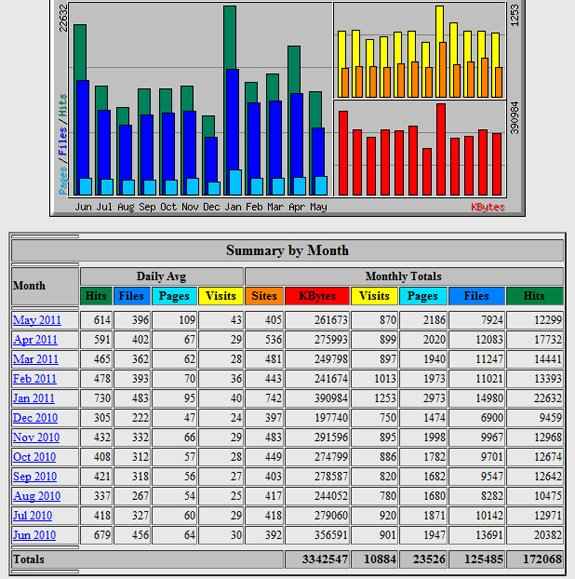
Follow these simple steps check my stats in Cpanel:
-Step1 : Decide what you want to know. Write down the information you want to know about your website (i.e. total number of requests, visits, referrers, and others). Be as specific as possible so you get all the information you need.
-Step2 : Go to your hosting control panel. Visit your account by going to http://yourdomain.com/cpanel. Make sure you replace the yourdomain.com with your actual domain name. Enter your username and password.
-Step3 : Open the statistics report. On the Cpanel main screen, click the “Web/FTP Stats” button which is found in the fourth row and then choose “awstats”. After clicking the option, the different statistics will now be displayed.
-Step4 : Read the statistics. The statistics will show the number of visits by country, month, day and hour, as well as referrers or URLs that directed a user to your website. You can also check the pages viewed by each user, each user’s operating systems and browsers, their searches in your website, traffic by domain and traffic by file among others.
-Step5 : Analyze the results. Print out the report and review it on a regular basis to help you solve traffic problems. You can also use the report to determine which part of your website is most popular and what needs to be modified.
| Product type | |
|---|---|
| License | |
| File Size (MB) | 91.6 |
Related products

SEO and Promotion PLR
$4.95
Quick View

SEO and Promotion PLR
$4.95
Quick View

SEO and Promotion PLR
$4.95
Quick View
SEO and Promotion PLR
$4.95
Quick View

SEO and Promotion PLR
$4.95
Quick View

SEO and Promotion PLR
$4.95
Quick View

SEO and Promotion PLR
$4.95
Quick View